Crafting Memorable Moments with a 750ml Wine Label Template
When you hand someone a bottle of wine, you’re giving more than a beverage. You’re offering an experience, a gesture, a memory waiting to happen. The difference between a generic store-bought bottle and one that feels genuinely personal often comes down to presentation. A thoughtfully designed label transforms a simple gift into something meaningful, and that’s exactly where a well-crafted 750ml Wine Label Template steps in to help.
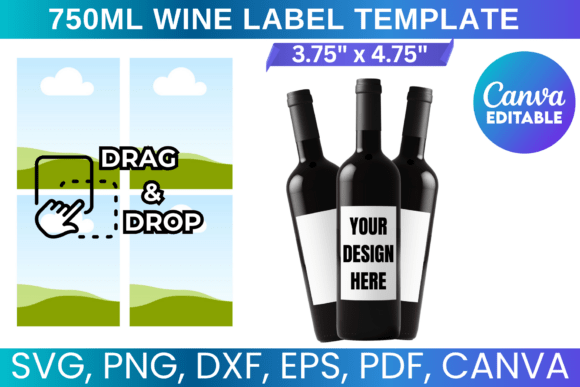
This particular template set was built with real projects in mind. Whether you’re preparing party favors for a wedding, branding bottles for a small winery, or creating custom gifts for the holidays, the design strikes a balance between elegance and approachability. The visual personality leans clean and versatile — structured enough to look polished, yet flexible enough to adapt to wildly different aesthetics. Think of it as a foundation rather than a finished product. The layout respects the natural curve of a standard 750ml bottle, with proportions that account for adhesive shrinkage and printer margins, so what you see on screen actually translates well to physical form.
Why This Template Works Across So Many Projects
One of the most practical strengths of this 750ml Wine Label Template is its compatibility range. The included SVG file works seamlessly with Cricut and Silhouette cutting machines, which matters enormously if you’re producing labels in batches. The DXF format extends that compatibility to older Silhouette models, while the PNG with transparent background gives you flexibility in Photoshop or any raster-based editor. For those who prefer a drag-and-drop workflow, the Canva link eliminates the learning curve entirely — you can customize text, swap colors, and adjust layouts without installing a single piece of software.
This kind of multi-format approach isn’t just convenient. It reflects an understanding of how people actually work. A graphic designer might open the SVG in CorelDraw to fine-tune vector paths. A small business owner might jump into Canva to mock up a seasonal release in ten minutes. A crafter preparing bridal shower favors might use the PDF on standard 8.5"x11" paper and cut by hand. The template accommodates all of these workflows without forcing anyone into a single tool.
Design Flexibility That Respects Your Vision
The visual structure of the template leaves room for personality. The text areas are positioned to create natural hierarchy — your brand name or event title sits prominently, while supporting details like vintage year, varietal, or a personal message occupy secondary space without feeling cramped. This kind of intentional layout mirrors what you’d see in professional packaging design, where every element earns its place on the label.
Color customization is straightforward. The template’s clean lines and neutral starting palette mean you can push it toward rustic farmhouse aesthetics with kraft paper textures and earthy tones, or steer it toward modern minimalism with stark whites and metallic accents. For brand identity work, this adaptability is critical. A boutique olive oil company could use the same template structure as a craft brewery — the visual DNA stays consistent while the surface personality shifts completely.
Real Applications: From Personal Gifts to Commercial Products
Let’s ground this in specific scenarios. Imagine you’re a small business owner launching a limited-run sparkling cider for the holidays. You need labels that look professional enough to sit on a retail shelf but don’t require a five-figure design budget. This template gives you that middle ground. You customize it once in Canva, export as PDF, print on adhesive label stock, and apply by hand. The result looks intentional and branded without the overhead of hiring a design agency.
Or consider the event planner coordinating a milestone anniversary dinner. Each table features a bottle with a custom label bearing the couple’s names, the date, and a short message. The 750ml Wine Label Template handles this beautifully because the layout already accounts for the kind of text density these personal touches require. You’re not fighting the design to squeeze in an extra line — the space was built for it.
Crafters and hobbyists find particular value here too. The SVG and DXF files work with cutting machines, which means you can produce intricate die-cut labels with decorative edges or layered elements. Pair the printed label with twine, a wax seal, or a custom tag, and you’ve elevated a simple bottle into a party favor that guests actually remember. This is where DIY design meets professional results, and the template serves as the bridge between the two.
Practical Considerations for Best Results
A few things worth noting before you start. The template dimensions fit standard 750ml bottles, but if you’re working with an unusually shaped bottle — a wide Burgundy base or a tall Riesling flute — measure the available label area first. The template can be manually adjusted, but starting with accurate measurements saves time. Print a test page on plain paper before committing to your final stock. Wrap it around the bottle and check alignment, text size, and color against the actual glass. What looks perfect on a backlit screen sometimes reads differently in ambient light on a curved surface.
For those using cutting machines, remember that blade settings vary by material. Adhesive vinyl behaves differently than cardstock, and both behave differently than sticker paper. Run a small test cut before processing an entire batch. These aren’t template-specific concerns — they’re just good practice that experienced crafters learn through repetition.
Building a Cohesive Look Beyond the Label
The best label designs don’t exist in isolation. They connect to a broader visual story. If you’re using this template for branding, think about how the label relates to your business cards, your website, your social media graphics. The typography choices you make on the label should echo — not necessarily replicate — the typefaces used elsewhere in your brand system. A serif font on the label paired with a sans serif font on your website can create sophisticated contrast. A script font for the product name paired with a clean sans serif for the details adds warmth without sacrificing legibility.
This is where font pairing becomes a practical skill rather than an abstract concept. The template itself doesn’t lock you into specific typefaces, which means you have the freedom to experiment. Try a few combinations. Print samples. See how different typeface choices change the perceived personality of the bottle. A bold, geometric sans serif might suggest modernity and confidence. A delicate handwritten font might evoke intimacy and craftsmanship. Neither is wrong — they just speak to different audiences and different occasions.
For commercial use, the licensing terms here are straightforward. You can create physical products for sale, which covers everything from bottles you sell at a farmers market to labels you produce for client projects. What you can’t do is redistribute the digital files themselves. That distinction matters for designers who want to offer label design as a service — you’re buying the right to use the template as a starting point for client work, not the right to resell the template as-is.
Ultimately, this 750ml Wine Label Template succeeds because it solves a real problem with practical tools. It meets you where you are — whether that’s a Canva beginner customizing your first party favor or a seasoned designer streamlining your packaging design workflow. The included formats, the thoughtful layout, and the focus on physical-world application make it a genuinely useful design asset rather than just another download gathering digital dust in your files folder.