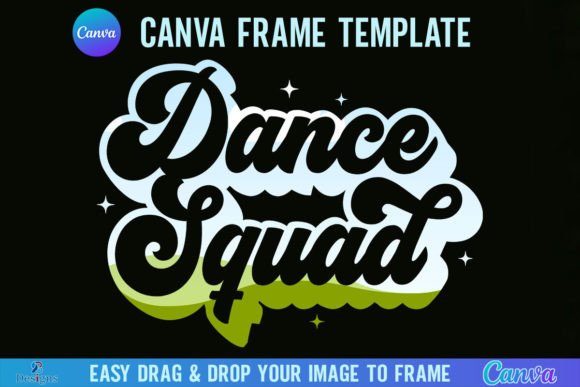
Designing Dynamic Dance Squad Visuals with Canva Frames
The Power of a Dedicated Frame Template
In the fast-paced world of digital marketing and social media, consistency is the key to brand recognition. For dance teams, studio owners, and choreographers, maintaining a cohesive visual identity across platforms can be a challenge without the right design assets. This is where the Dance Squad Canva Frame Template steps in as a practical solution. It is not merely a decorative border; it is a structured design system built to house your photography and graphics in a professional manner. By utilizing a pre-set frame, you eliminate the guesswork of alignment and sizing, ensuring that every post, whether it is for Instagram Stories or a Facebook cover, looks polished and intentional.
When you download this template, you receive a streamlined workflow. You will get one ZIP file containing a single PDF. Inside that PDF is a direct link to the Canva editor. Once you click the link, you gain immediate access to the templates. The package includes two distinct versions: a Grouped version for easy resizing and moving, and an Ungrouped version that allows for granular editing of individual elements. This dual-format approach caters to different levels of design comfort, making it an accessible tool for both seasoned designers and team managers with limited experience.
Visual Characteristics and Aesthetic Appeal
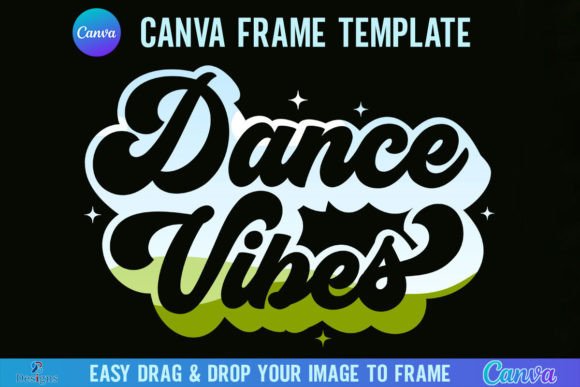
The visual language of the Dance Squad Canva Frame Template is designed to capture the energy and precision of dance. The frame itself acts as a visual anchor, grounding the dynamic movement of the dancers within a defined space. The paper size is set at a robust 4000x4000 pixels. This high resolution is crucial for modern content creation. It ensures that your images remain crisp and clear whether they are viewed on a mobile device or printed on physical materials like flyers or posters. The square aspect ratio is the industry standard for social media grids, particularly on platforms like Instagram, ensuring your content fills the screen without awkward cropping.
The appeal of this template lies in its versatility. It functions as a neutral yet stylish container. It does not compete with the subject matter—your dancers—but rather enhances it. The frame creates a sense of boundary and professionalism, elevating amateur snapshots to brand-level content. It is a design asset that brings order to the visual chaos of performance photography. By framing the image, you guide the viewer’s eye directly to the action, creating a focal point that is essential for effective visual hierarchy.
Practical Application: Drag, Drop, and Design
One of the most significant advantages of this product is the simplicity of its mechanics. The core functionality relies on the "drag and drop" technique native to Canva. You can easily drag any PNG or JPG background image into the frame to fill it instantly. This process is seamless and requires no masking or clipping path knowledge, which are typically required in more complex software like Adobe Photoshop. For a busy content creator, this efficiency is invaluable. You can take a photo from a rehearsal, drop it into the frame, add your team logo, and have a graphic ready for posting in under a minute.
It is important to note the technical requirements to ensure a smooth experience. You will need a free Canva account to open and edit the template. However, if your goal is to export the design with a transparent background—which is often necessary for layering graphics over video footage or using them in other design software—you must have a Canva Pro version or higher. This distinction is vital for professional designers who need to integrate these frames into a larger, multi-platform branding strategy. The transparency feature allows the frame to float over other elements, adding depth and complexity to your compositions.
Strategic Use in Branding and Marketing
From a brand strategy perspective, the Dance Squad Canva Frame Template serves as a tool for building brand equity. A consistent visual framework helps audiences instantly recognize your content in a crowded feed. When a follower sees the specific shape and style of your frame, they immediately associate it with your team's brand identity before they even read the text or identify the dancers. This is the essence of brand recognition.
This template is ideal for a variety of applications. It works exceptionally well for creating:
- Social Media Graphics: Perfect for Instagram posts, Facebook updates, and Pinterest pins.
- Event Promotions: Use the frames to highlight guest dancers or showcase the schedule for an upcoming recital.
- Merchandise Mockups: Frame images of your team to create mockups for t-shirts or posters.
- Digital Newsletters: Insert framed images into email marketing campaigns to break up text and add visual interest.
By utilizing this asset, you are not just decorating a photo; you are curating an experience. It helps in maintaining a professional standard that can influence how potential clients, sponsors, or new members perceive your organization. A polished look suggests a polished performance, impacting audience engagement and trust.
Technical Considerations and Workflow Tips
While the template is user-friendly, a few technical notes can optimize your workflow. First, always ensure your source images are high-quality. Since the canvas is 4000x4000 pixels, low-resolution images will appear pixelated or blurry when stretched to fit the frame. Aim for source photos that are at least 2000 pixels on the shortest side for the best results.
Second, remember that this is a digital product. No physical frames will be shipped. This distinction is important for inventory management—it is an instant download that lives on your hard drive or cloud storage. Furthermore, it is explicitly designed as a Canva Frame Template. It is not an SVG file, and therefore, it is not suitable for use with Cricut Design Space or Silhouette cutting machines. If you are a crafter looking to create physical vinyl decals or cutouts, this specific file format will not translate to those machines. It is strictly for digital graphic design and print-on-demand applications.
Conclusion: Elevating Your Visual Content
In summary, the Dance Squad Canva Frame Template is a practical, high-resolution design asset that simplifies the creation of professional graphics. It bridges the gap between raw photography and polished branding. By using the Grouped and Ungrouped versions effectively, and by leveraging the drag-and-drop interface, you can streamline your content production process. Whether you are a small business owner promoting a studio or a content creator managing a team's social presence, this template provides the structure needed to make your visuals stand out.