Master Your 2024 Projects with the Dot Grid Planner Canva Template
More Than a Grid: A Strategic Design Asset
When we talk about typography, we usually discuss serifs, kerning, and weight. However, for designers and entrepreneurs, the underlying structure of a page is just as critical as the typeface you choose to fill it. The 2024 Dot Grid Planner Canva Template represents a shift from rigid linear planning to a fluid, creative workflow. Visually, it offers the architectural precision of graph paper but with the breathing room of a blank canvas. The dot grid provides subtle guidance—a "ghost" framework that allows you to align elements, create custom layouts, and sketch ideas without the visual noise of heavy borders.
This template isn't just a collection of pages; it is a cohesive design asset. The personality of this planner is minimal, modern, and adaptable. It appeals to the professional who values whitespace as much as content. Whether you are a brand strategist mapping out a client’s visual identity or a content creator storyboarding a video series, the visual style of the dot grid adapts to your needs rather than forcing you to adapt to it. It is the ultimate tool for those who find traditional planners too restrictive.
Strategic Applications: From Brand Identity to Editorial Design
The utility of the 2024 Dot Grid Planner Canva Template extends far beyond simple to-do lists. In the realm of editorial design and publishing, this format is invaluable for creating custom layouts. Imagine using the grid to design unique mood boards for your next magazine spread or aligning text blocks for a web design wireframe. The grid ensures that your elements maintain consistent margins and alignment, which is the cornerstone of professional modern typography.
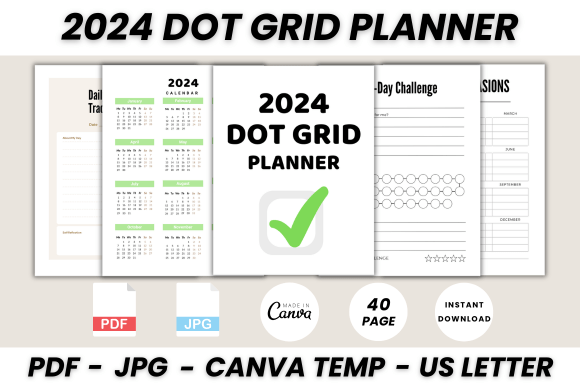
For small business owners and marketers, the template serves as a central hub for brand identity management. The included sections—such as the Password Log, Contact List, and Key—allow you to standardize your operations. However, the real power lies in the creative pages. Use the 30-day challenge and Habit trackers to gamify your marketing goals. Utilize the Monthly Log to visualize campaign timelines. Because the files are editable in Canva, you can easily integrate your logo design, brand colors, and preferred font pairings into the PDF, turning a generic planner into a bespoke corporate asset.
Furthermore, the aesthetic of the dot grid pairs exceptionally well with specific typography styles. If your brand uses a modern sans serif font for headers, the geometric nature of the dots will complement the clean lines of the typeface. Conversely, if you are a crafter or artist, the grid pairs beautifully with a handwritten font or script font, balancing the fluidity of your lettering with the structure of the page.
Optimizing Readability and Visual Hierarchy
A common struggle in packaging design and digital planning is maintaining a clear visual hierarchy. The 2024 Dot Grid Planner Canva Template solves this by providing a consistent scale. When you place text onto a dot grid, you are forced to consider the leading (line height) and tracking naturally. This results in improved readability.
Consider the Weekly Planner section. Without a grid, you might accidentally crowd your tasks, making the page look chaotic and stressful. The dot grid encourages you to assign a specific vertical height to each task, creating a rhythm on the page. This is particularly helpful for social media graphics planning. You can use the dots to map out the exact dimensions of an Instagram post or a Pinterest pin, ensuring that your text remains within safe zones and your serif font headers don't clash with body text.
The template also includes features like the Today I’m Grateful For section and 5 Minute Journaling pages. These are not just fillers; they are tools for mental clarity. By structuring your thoughts on a grid, you bring order to abstract ideas. This is a technique often used in UX design to map user journeys—applying it to personal productivity allows you to "debug" your own workflow.
Practical Guidance for Customization
One of the strongest features of this package is the flexibility of the editable Canva template. You do not need to be a premium font expert or a software engineer to customize it. The process is intuitive, but here are some professional tips to get the most out of your creative font choices and layout.
First, consider your font pairing strategy. Since the 2024 Dot Grid Planner Canva Template is inherently neutral, it can support heavy typographic contrast. Try pairing a bold, condensed display font for your monthly headers (like "January" or "February") with a highly legible, lighter weight body font for your notes. This creates a strong hierarchy that makes navigation instant.
Second, leverage the grid for alignment. When adding images or stickers in Canva, use the dots as your guide. Align the edge of a photo with a vertical line of dots, and ensure your text sits on the baseline formed by the horizontal dots. This attention to detail separates amateur layouts from professional design assets.
Finally, think about the commercial aspect. If you are a coach or a consultant, you can customize this planner and sell it to your clients. The commercial font licensing for the elements included in the template allows for this flexibility. You can create a branded planner that includes your specific Key for productivity or a specialized Birthday List for client relationship management. The ability to resize the US Letter format to fit digital tablets or print booklets makes it a versatile tool for any entrepreneur or blogger looking to systematize their success in 2024.